writing/ accessibility · · revised · by Alex Bouchard
Sibling contrast
A shade of gray gave my players a headache, and every readability check I ran said the gray was fine.
I would stare at the board, know something was wrong, and have nothing to point at. Finding the missing check took three grays, a research report long enough to feel like a thesis, and more color math than I ever expected to do for a word game.
01 / the board I could not explain
Yapword is my daily word game. It launched with green, yellow, and gray. I wanted it to look like itself, and navy and gold suited an emperor. So correct became navy, present became gold, and absent became a bluish slate.
Every text contrast check passed. White on the navy was 14.22:1. White on the slate was 5.80:1. The dark letters on gold were 9.68:1. All three cleared the 4.5:1 WCAG minimum for normal text. That passing result was one of the reasons I kept looking somewhere else. W3C: text contrast and relative luminance ↗
Then a player wrote in. Correct letters and absent letters looked too much alike. I could see it too. I just could not explain why the board felt wrong when the numbers I had checked said it was fine.
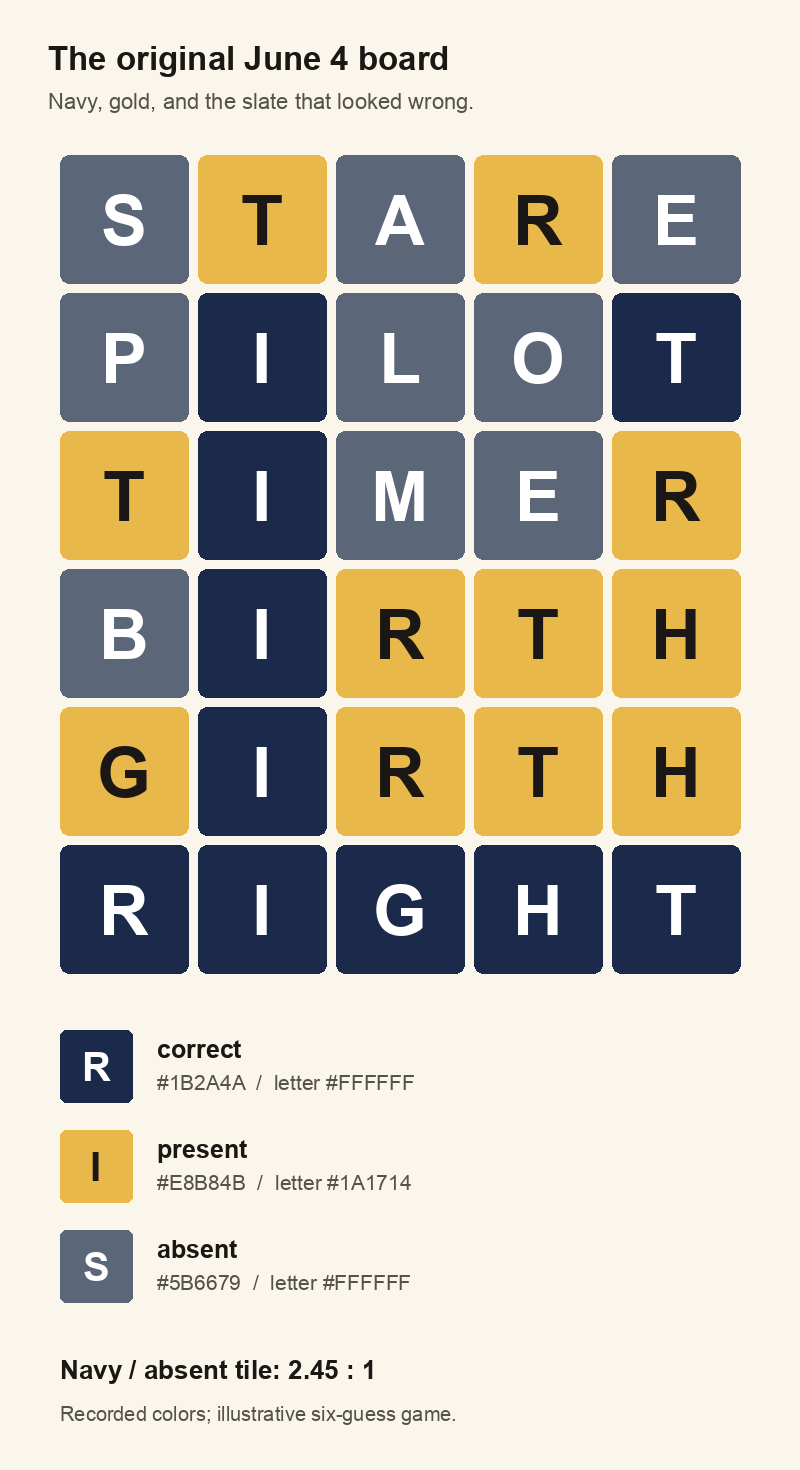
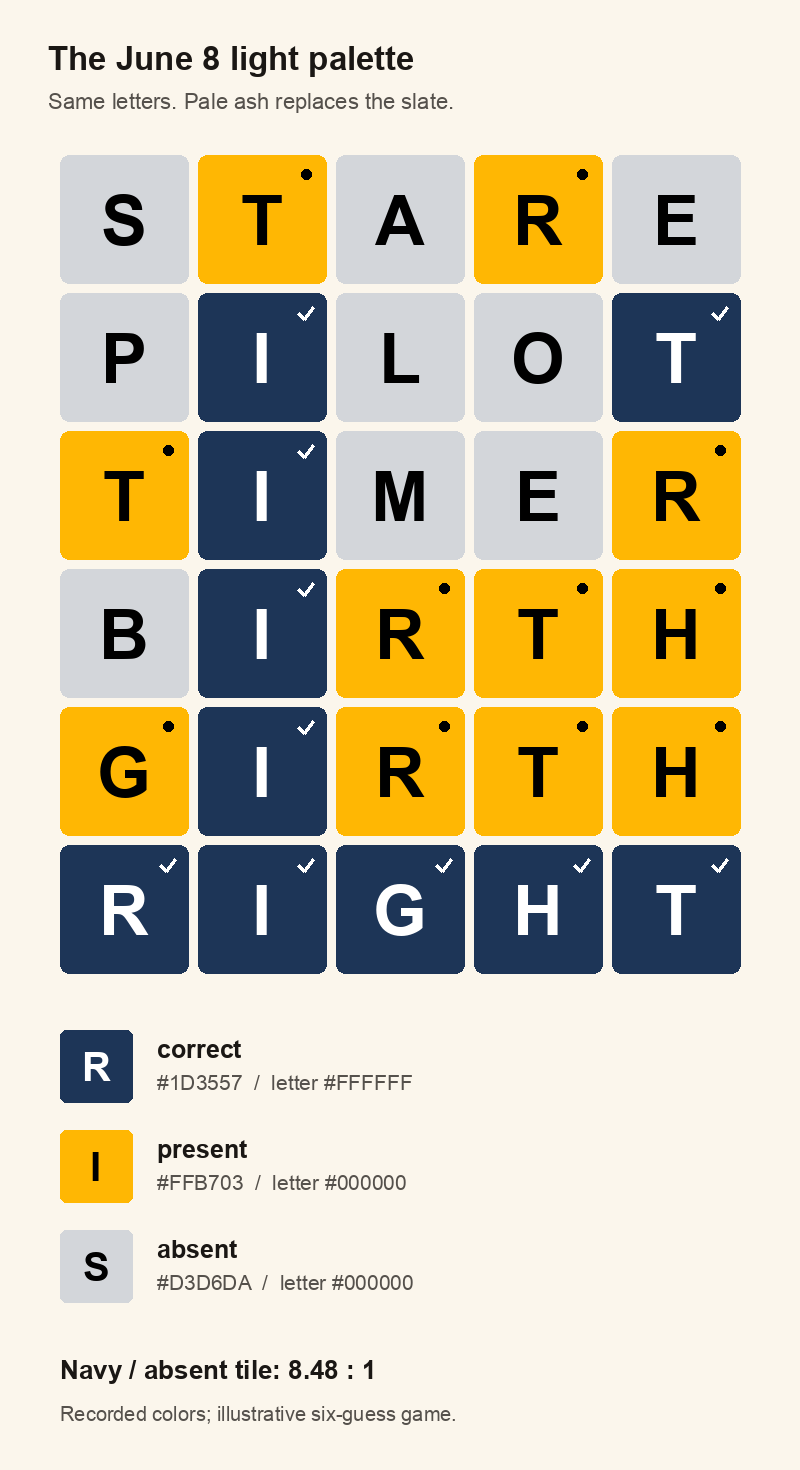
Look at the I in the middle rows of the original board. It is correct. The white letters on the slate around it are absent. Both states are dark, both are cool, and both carry the same white typography. The gold is easy to notice. The navy and slate are the pair that made me stop and look again.
I had checked whether you could read a letter. The game was asking you to recognize what had happened to that letter. Those are two checks, and I had only run one.
02 / a thesis on a gray square
I went much further down this hole than one gray tile should require. The June report alone ran to 6,202 words before its bibliography, with 34 listed references. At 500 words a page, that is roughly twelve single-spaced pages of prose, before the sources. We had effectively written a thesis on a gray square.
The trail ran through relative luminance, human color vision, color-vision deficiency, light and dark themes, and the difference between seeing a letter and separating two states. Following the vision question further gets you to red and green, cockpit lighting, and military night vision. All because a word game looked a little off.
Meanwhile, I kept changing the gray. Three grays went out between June 4 and June 8. Lightening the original slate improved navy against slate from 2.45:1 to 3.10:1. It also dropped gold against slate from 3.14:1 to 2.49:1. I had moved the problem one tile over.
The next gray put both pairs at 2.78:1. That was an impressively precise way to leave two things wrong.
The report was not infallible either. It quoted white on the eventual navy, #1D3557, at 10.6:1. Recomputing it gave 12.36:1. One of its proposed high-contrast sets had a 1.90:1 pair hidden inside it. A long document with citations and decimal places had given me another thing to trust before I checked it.
So I stopped treating the report as a verdict and turned the calculation into a script. Seven numbered equations below show the path through that audit.
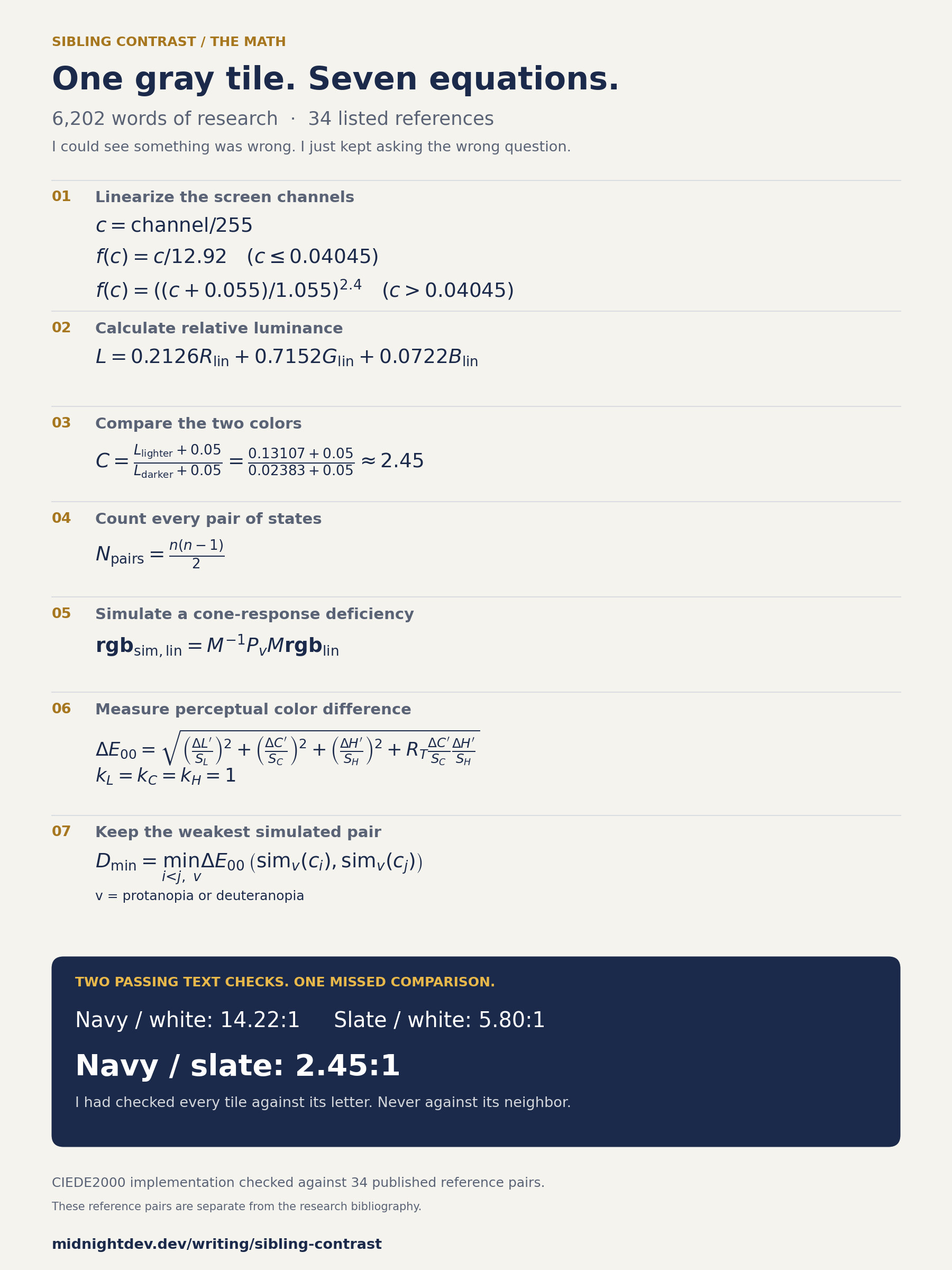
My developer toiled through 6,202 words, 34 references and seven equations to fix one gray tile.
Yapoleon had to sit there looking magnificent the entire time.
Nobody counts that work.
03 / the number I had never calculated
A hex color is three screen-channel values. To compare brightness, you first turn those values into linear light, then calculate relative luminance, then compare the two results. The first three equations are the WCAG calculation. W3C: text contrast and relative luminance ↗
Each red, green, or blue channel starts between 0 and 255. Divide it by 255, then apply this function. A hex value is encoded for a screen; treating it as a direct measure of light gives you the wrong calculation.
The channels do not contribute equally. The weights belong to the sRGB relative-luminance calculation; they are not percentages of cone cells in your eye. For the original navy, L is about 0.02383. For the slate, it is about 0.13107.
White against navy gives 14.22:1. White against slate gives 5.80:1. Navy against slate gives 2.45:1. The same formula explains both the reassuring passes and the pair I had missed.
That 2.45:1 was the number I had never asked for. The letters were readable. The fills did not separate enough for the distinction I was asking them to carry.
I call that missing comparison sibling contrast: the contrast between colors that mean different things and appear together. A status pill has siblings. So does a chart legend. A game board has thirty of them sitting in front of you.
WCAG already addresses this territory. Non-text Contrast asks for 3:1 against adjacent colors where the graphical information is needed to understand the content; G209 explains testing adjoining colors or separating them with a suitable border. A grid’s gaps, markers, and actual layout matter to that assessment. I use 3:1 across every semantic fill pair as an audit flag, rather than claiming every separated tile pair is automatically a conformance failure. W3C: non-text contrast ↗; W3C G209: contrast at adjoining colors ↗
Correct, present, and absent make three pairs. Four theme variants make twelve pairs before any color-vision simulation. Add empty, typed, or disabled states and the table grows. Fixing the one pair you happen to notice is how you miss the next one.
There were already tools that compared whole palettes. I had not invented new color science. I had found a hole in my own checks and given it a name I would remember. Contrast Grid: an earlier tool for every palette pair ↗; Viz Palette: earlier palette and color-vision comparisons ↗
04 / why red and green are so useful
The next question was why familiar colors can feel effortless. Red and green are useful signals partly because we have learned their meanings, and partly because human vision has machinery for telling their hues apart.
The retina starts with long-, medium-, and short-wavelength cone signals. Some retinal circuits compare the long and medium signals in opposition, forming a red–green pathway; others contribute to a blue–yellow pathway. Color is built from relationships between responses. The names “red cone” and “green cone” are convenient shorthand for receptors with overlapping sensitivities. Dacey (1996): circuitry for color coding in the primate retina ↗
That machinery helps explain why distinct hues can separate states even when a brightness-only ratio is small. It also explains why you cannot assume the same separation for everyone: red–green deficiencies change the signals the comparison depends on. A familiar green success state still needs a second way to communicate its meaning. W3C: use of color ↗
The original green and amber Yapword board makes the point awkwardly well. Its pairwise luminance ratios were lower than the navy board’s. Yet hue supplied another distinction. In the two deficiency simulations, its weakest color difference was only 8.1, the lowest result in this audit. Keeping green would not have solved accessibility by itself.
05 / somehow, military night vision
This is the part of the rabbit hole I like most. Once you ask why green is so visible, you end up reading about night vision goggles. I started with a gray square. Now there are phosphors.
The standard daylight luminous-efficiency curve peaks near 555 nanometers, in the yellow-green part of the spectrum. Under dark-adapted, rod-dominated conditions, the peak moves toward blue-green, around 507 nanometers. “Your eye is sensitive to green” needs a lighting condition attached to it. CIE: photopic spectral luminous efficiency data ↗; CIE: scotopic spectral luminous efficiency data ↗
That sensitivity makes the appeal of a green display easier to understand. But the green in an image-intensifier display comes from its phosphor. The image is monochrome: brightness differences carry the scene. A green display can make useful brightness information visible without trying to reproduce the scene’s original colors.
A 1996 study from the U.S. Army Aeromedical Research Laboratory compared two green phosphors, P22 and P43, plus a mixed pair, in six subjects. It found no difference in visual acuity or static contrast sensitivity under the simulated night conditions tested. Dynamic contrast sensitivity was slightly better with P43, possibly because of its faster decay. Even two greens needed an experiment; the color name alone did not settle the question. Rabin and McLean (1996): U.S. Army Aeromedical Research Laboratory phosphor comparison ↗
The Army has also fielded white-phosphor systems, including the ENVG-B. Green has a long history in night vision, but newer devices make clear that a green tint is not the only way to present a useful intensified image. U.S. Army (2019): fielding white-phosphor ENVG-B goggles ↗
Red turns up for a different reason. The FAA describes dim red cockpit lighting as a way to support dark adaptation, while warning that it distorts chart colors and can make focusing harder. Preserving outside night vision and reading a color-coded instrument are different jobs. FAA: vision in flight and dim red cockpit lighting ↗
The useful connection back to Yapword is that display color, brightness, adaptation, and the task all interact. A military phosphor study cannot tell me whether my gray tile causes a headache. It can remind me how much I was trying to conclude from one passing ratio.
06 / a ratio cannot see hue
Relative luminance compresses a color into one number. That makes the contrast ratio useful, and it also leaves hue and chroma out. I needed another column beside it.
M takes linear RGB into LMS, a space based on long-, medium-, and short-wavelength cone responses. Pᵥ applies the projection for the selected deficiency. The inverse matrix brings it back to RGB; the script then clips and re-encodes it. I ran the pairs through protanopia and deuteranopia models. These are simulations of particular conditions, not a test of every player’s eyes.
The audit script uses a Viénot-style dichromat projection. After projection, it converts the colors to CIELAB and calculates CIEDE2000, which adjusts for the fact that equal numerical changes do not look equally different in every part of color space. Viénot, Brettel and Mollon (1999): color maps for dichromats ↗; Sharma, Wu and Dalal (2005): CIEDE2000 formula and reference tests ↗
This is the CIEDE2000 combination with the three parametric factors set to 1, as in the script. The primed differences and S terms adjust lightness, chroma, and hue; Rₜ accounts for their interaction. The full calculation includes RGB-to-CIELAB conversion and hue-angle corrections. It gives the audit a way to rank differences that a luminance ratio leaves out.
Yes, that is where a gray square took us. Hue angles, weighting terms, a square root, and a script checked against 34 published CIEDE2000 reference pairs. The research bibliography also had 34 entries; those are separate counts.
For each palette, I keep the smallest difference across all three state pairs and both simulations. A larger value means more separation in this model. There is no WCAG pass threshold for this column, and it does not measure comfort. It tells me which pair deserves attention first.
This is why the audit keeps both columns. A pair can have modest luminance separation and a larger simulated hue difference. Another pair can look reassuring in one model and remain a problem in the actual board. Neither column replaces showing it to people.
07 / what the full table showed
These are the five recorded palette versions, with the last version split into light and dark themes. I recomputed them on October 13, 2026 with the linked script. The ratios compare the tile fills. The last column is the smallest CIEDE2000 difference across all three state pairs and both deficiency simulations.
| palette | shipped | correct / absent | correct / present | present / absent | smallest simulated difference |
|---|---|---|---|---|---|
| green, amber, warm gray | 05-23 | 1.46 | 1.50 | 1.02 | 8.1 |
| navy, gold, slate #5B6679 | 06-04 | 2.45 | 7.71 | 3.14 | 20.8 |
| navy, gold, slate #6A768A | 06-07 | 3.10 | 7.71 | 2.49 | 26.5 |
| navy, gold, slate #656E81 | 06-08 | 2.78 | 7.71 | 2.78 | 23.6 |
| final, light theme | 06-08 | 8.48 | 7.08 | 1.20 | 32.1 |
| final, dark theme | 06-10 | 2.47 | 2.75 | 6.79 | 26.2 |
Going pale finally separated the original problem pair. The light palette put correct against absent at 8.48:1. It gave me a concrete answer to the navy/slate problem I had been staring at.
It did not make every pair pass. Gold against ash was still 1.20:1. The board also used a check for correct, a dot for present, and no marker for absent, so meaning had another channel. Color alone should not have been carrying the whole game in the first place. W3C: use of color ↗
The dark theme still has two fill pairs below 3:1, at 2.47 and 2.75. Typed but unsubmitted tiles add more comparisons: absent against unsubmitted is 1.46:1 in light and 1.50:1 in dark. Those remain part of the work.
What I can show here is the missed comparison, the palette history, and the recomputed numbers. I did not run a controlled player study or measure whether the later palette reduced headaches. The math explains the gap in the checks; that is the claim the evidence supports.
08 / the check I run now
A state color has two jobs: make its label readable and make its meaning distinguishable. I had been checking the label. Now I write down the whole set of comparisons.
- List the states, including empty, typed, and disabled ones.
- For each theme, check text against fill and every meaningful fill against its siblings.
- Run color-vision simulations and inspect the weakest pair, with the simulation assumptions recorded.
- Add a marker, a border, a label, or another channel where color does too much of the work.
- Keep the numbers in a regression check so the next small gray tweak cannot quietly erase a distinction.
- Recompute the figures in any report you use. Then show the actual board to players, including people with the deficiencies you simulated.
The audit is one Python file with no dependencies. Give it your state fills and text colors; it prints text contrast, every fill pair, and the smallest simulated difference. It does not know your layout, your screen brightness, or the person looking at it.
Download the audit script · Example input · Read the Markdown essay
I could see something was wrong the whole time. I just kept asking the colors the wrong question.
Check the neighbors too.